Feature flags without the tech debt

When a rollout finishes, a GitHub Action opens one reviewable pull request per dead flag and removes the code path in thirteen languages, with no LLM involved. Percentage rollouts, targeting, A/B tests and kill switches come with it, across 13 SDKs. One flat price with nothing metered. No active users, no service connections, no evaluation caps, no overage.

Free forever on the Solo plan. No credit card required.

npm install @featureflip/browser

Running something else? There are 12 more SDKs.

app.js
import { FeatureflipClient } from '@featureflip/browser';

const client = FeatureflipClient.get({
  clientKey: 'sdk_client_a1b2c3d4',
});
await client.initialize();

if (client.boolVariation('new-checkout', false)) {
  showNewCheckout();
}

The whole life of a flag

Create it from your editor, ramp it from the dashboard, and let the cleanup Action open the pull request that takes it back out. You review it. The merge archives the flag.

  1. Create

    agent → featureflip

    create_flag("new-checkout")

    Created. Disabled in every environment.

    Ask your agent for it over MCP, or declare it in Terraform. New flags land disabled in every environment, so nothing moves until you say so.

    Create flags over MCP

  2. Ramp

    new-checkout 100%

    production · percentage rollout

    Take the rollout from 10% to 100% in the dashboard, through the API, or by asking the agent. Each change streams to your SDKs over SSE. Nothing redeploys.

    Rollout strategies

  3. Detect

    production

    Dead

    Fully rolled out. One variation to 99.9% of evaluations.

    Featureflip reads the evaluation traffic each flag actually receives, hourly, per environment. A signal that holds for 30 days marks the flag stale. At 90 days it is dead.

    Staleness signals

  4. Remove

    Remove dead feature flag: new-checkout

    featureflip/remove-flag/new-checkout

    Merged. Flag archived.

    The Action opens one reviewable pull request per dead flag, rewriting the code with AST transforms and no LLM, so the same repository always produces the same diff. Merge it and the flag is archived. Whatever it declines, like a flag read behind your own wrapper, your agent removes over MCP.

    Flag cleanup Action Remove over MCP

Ship the flag. Then get it out of your codebase.

Toggle, target, and roll out features from a real-time dashboard built for engineers who ship often.
Staleness signals

  • Fully rolled out

    Enabled and serving one variation to 99.9%+ of evaluations.

  • Rolled back

    Disabled, with at most one variation served.

  • No traffic

    Enabled but receiving zero evaluations.

  • Never used

    Created and never evaluated in this environment.

Stale after 30 days Dead after 90 days

Dead flags leave in a pull request

A GitHub Action opens one reviewable pull request per dead flag, deletes the code path across thirteen languages with no LLM involved, and archives the flag when you merge. The detection behind it needs nothing installed and runs hourly, per environment, from the evaluation traffic each flag actually receives.

How removal works Stale flag detection MCP server

resource "featureflip_feature_flag" "new_checkout" {
  project = "web"
  key     = "new-checkout"
  name    = "New Checkout Flow"
  type    = "Boolean"
}

resource "featureflip_flag_environment" "prod" {
  project     = "web"
  flag        = featureflip_feature_flag.new_checkout.key
  environment = "production"
  enabled     = true
}

Manage flags as code

Declare projects, flags, targeting rules, and segments in Terraform, then apply them like the rest of your infrastructure. Flag changes get reviewed in a pull request, promote cleanly between environments, and stay reproducible.

Terraform provider

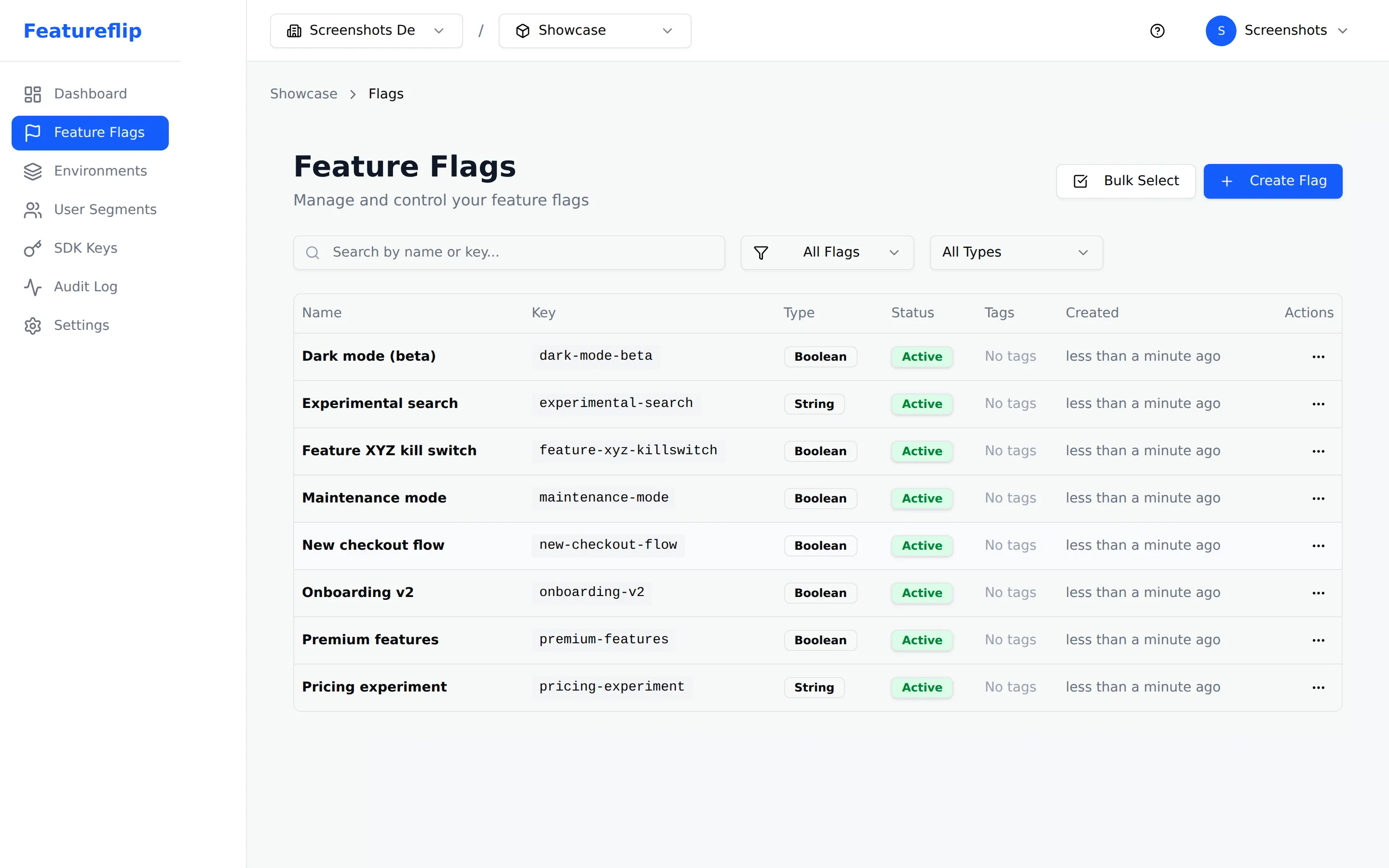
Featureflip dashboard showing eight feature flags across development and production environments, with toggle states and types

Instant rollouts

Toggle features on or off across every environment in real time. No deployments, no restarts, no waiting — your change is live everywhere within milliseconds.
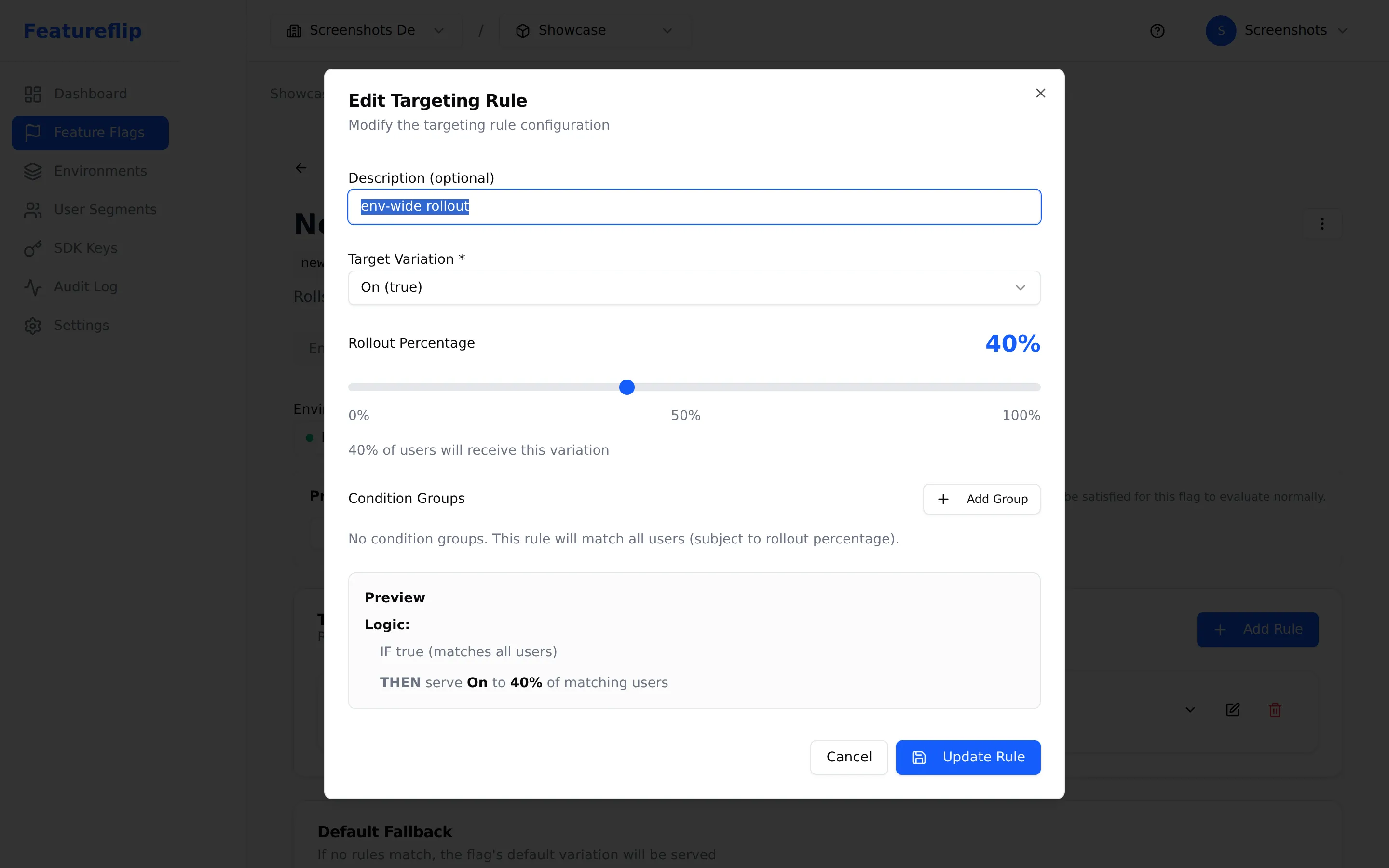
Targeting rule editor with a 40% rollout slider, showing the rule will serve On to 40% of matching users

Gradual, percentage-based rollouts

Ship to 1%, then 10%, then 100%. Watch metrics with every step. If anything looks off, roll back by moving the slider — no re-deploy required.
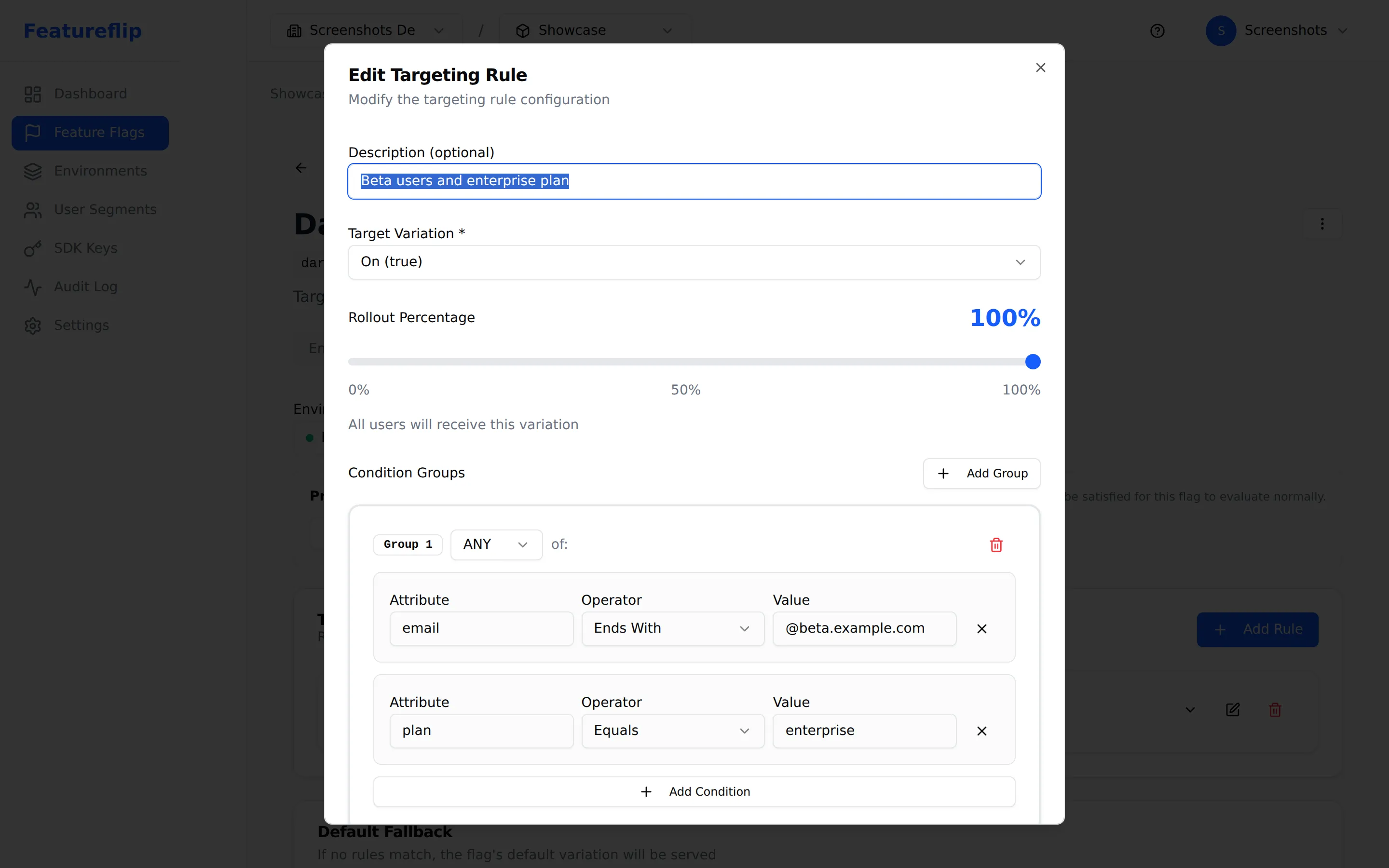
Targeting rule editor with a condition group matching users whose plan equals enterprise or whose email ends in @beta.example.com

Surgical targeting

Combine attributes, segments, and plan data into AND/OR condition groups. Target by region, plan, cohort, or any custom attribute your app tracks.
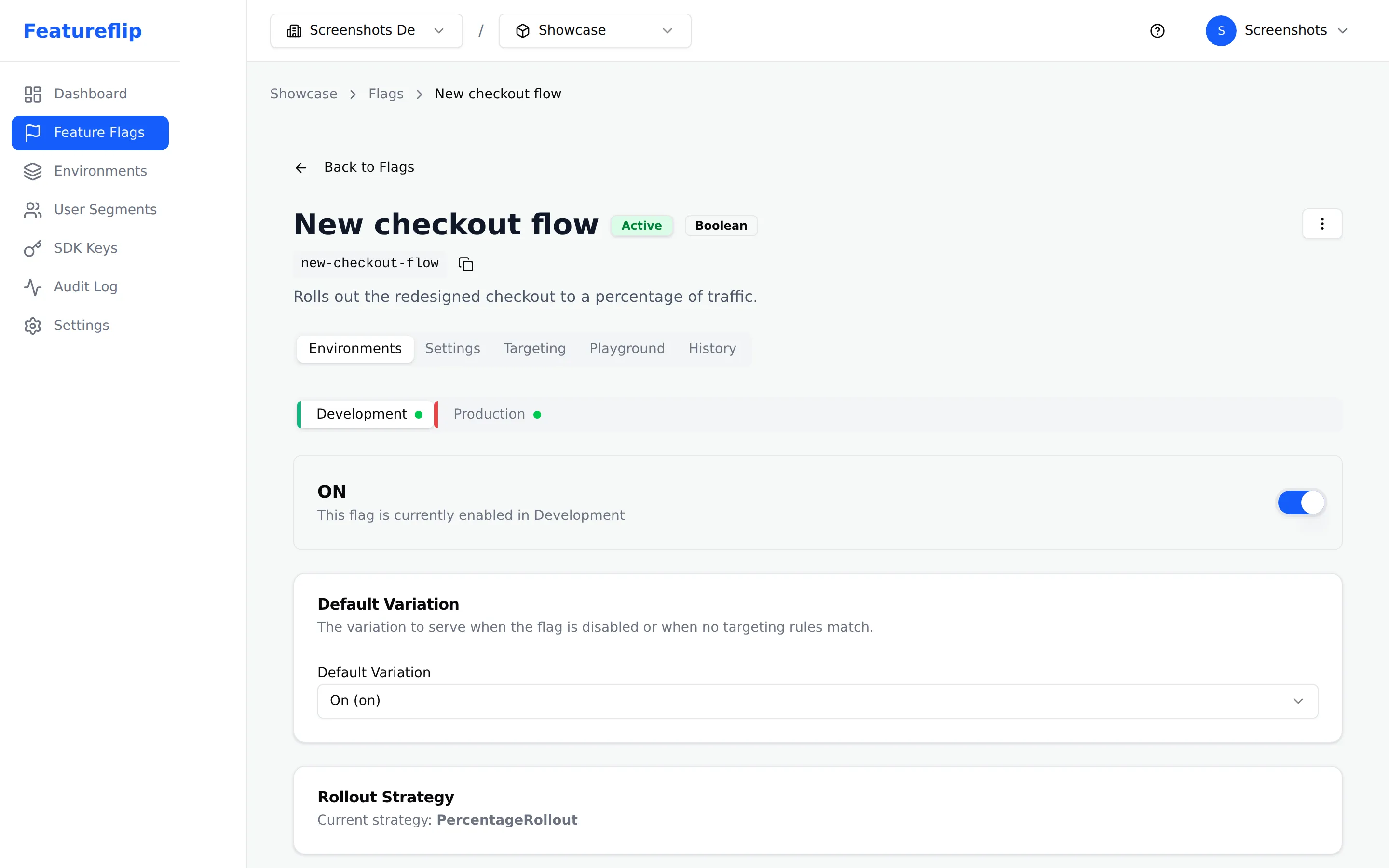
Flag detail page showing Development and Production environment tabs with the Development environment selected and the flag enabled

Multi-environment by default

Keep development and production configurations fully isolated. Promote the exact state forward when you are ready — or keep them intentionally different.

Thirteen SDKs. The cleanup handles every one of them.

Drop-in libraries in 13 languages and frameworks. Server SDKs evaluate in process, so a flag check costs a function call and no network round trip, returning in well under a millisecond. Client SDKs stream live updates to the browser.

Because a server SDK reads from an in-memory copy of your configuration, it keeps serving flags when Featureflip is unreachable and re-syncs on its own once we are back. We wrote up what separates an SDK that recovers from one that needs a restart.

Prefer a vendor-neutral API? Featureflip also ships OpenFeature providers for Node.js, .NET, Python, Go and Java.

How much does Featureflip cost?

Start free, scale as you grow.

Billing interval
Save ~20%

Every plan includes percentage rollouts, targeting rules, kill switches, all 13 SDKs, the Management API, and the Terraform provider. Plans differ only in scale.

Solo

Free

Free forever, and built to run in production

  • 10 flags per project
  • 2 environments
  • 1 project
  • 1 developer
  • 7-day audit logs
  • Management API access
  • Community support
Get Started Free

Pro

$49 $39 /mo

billed annually

For teams shipping features together

  • Unlimited flags
  • 5 environments
  • 10 projects
  • Up to 10 team members
  • 30-day audit logs
  • Management API access
  • Email support
Get Started

Business

$149 $119 /mo

billed annually

For growing organizations that need more room

  • Unlimited flags
  • Unlimited environments
  • 25 projects
  • Up to 25 team members
  • 90-day audit logs
  • Management API access
  • Priority support
Get Started

Need more? Contact us for Enterprise pricing.

Already using LaunchDarkly? Featureflip is flat per plan, with nothing metered: no charge for active users, service connections, evaluation volume, or overage. Put your own numbers through the LaunchDarkly cost calculator to see what that changes, or read the full comparison on pricing math, feature parity, and migration.

Frequently asked questions

What are feature flags?
Feature flags (also called feature toggles) let you turn functionality on or off in a running application without deploying new code. That decouples deploy from release: you can merge to production with a feature switched off, then turn it on for 1% of users, expand to everyone, serve a different variation to one cohort for an A/B test, or kill it the moment a metric moves the wrong way. No rebuild, and the change reaches your SDKs in seconds.
Is Featureflip free to use?
Yes! The Solo plan is free forever and includes 1 project, 10 flags, and 2 environments. Paid plans start at $49/month ($39/month billed annually) for teams that need more projects, members, and advanced features.
What programming languages are supported?
Featureflip provides official server-side SDKs for JavaScript/TypeScript, Node.js, Python, C#, Java, Go, PHP, and Ruby, plus client-side SDKs for React, Browser, Swift, Flutter, and Android. You can also integrate directly with the Evaluation API using any HTTP client.
How is Featureflip different from other feature flag platforms?
Featureflip closes the loop on a flag. Once a flag is finished, a GitHub Action opens one reviewable pull request per dead flag, removes the code path in thirteen languages with no LLM involved, and archives the flag when you merge. The price is flat per plan and nothing is metered, so there is no charge for active users, service connections, evaluation volume, or overage. Percentage rollouts, targeting, kill switches, and all 13 SDKs are included at every tier, including the free Solo plan, which is meant to run in production rather than expire after a trial.
Can I manage feature flags through an API?
Yes. The Management API exposes everything the dashboard does over REST: create and toggle flags, manage environments, targeting rules, segments, and SDK keys. It is included on every plan, changes stream to your SDKs live, and every API change is recorded in the audit log.
What happens to my app if Featureflip goes down?
It keeps serving flags. Server SDKs hold your flag configuration in memory and evaluate it inside your own process, so a flag check never waits on a call to us. If Featureflip becomes unreachable, the SDK carries on evaluating against the last configuration it received, and any flag it cannot resolve returns the default you passed at the call site. It also reconnects on its own, retrying with capped exponential backoff and dropping to polling when a stream will not hold. Every reconnect pulls a full configuration snapshot, so a flag you changed during the gap gets picked up without anyone restarting a process.

Ship your first flag in about five minutes

Create a flag, drop in the SDK for your stack, and toggle it live. One flat price when you outgrow the free plan, whatever your team size or traffic.

Free forever on the Solo plan. No credit card required.